
Loading…
This is taking a little longer than usual. Please wait a moment.
Loading…
This is taking a little longer than usual. Please wait a moment.
FiberApps BV
Diestseweg 162/D
2440 GEEL, België
BTW: BE0719.475.724
Ondernemingsnummer: 0719.475.724
E-mail: [email protected]
Tel: +3238082065 (Ma-Vr: 09u00-17u00)

© 2026 FiberCommerce (part of FiberApps bv). All rights reserved.
VAT: BE0719.475.724 - Company No: 0719.475.724

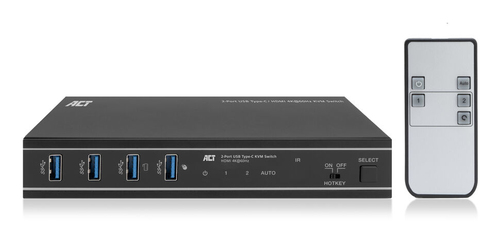
ACT 2-Port USB-C/HDMI 4K@60Hz KVM switch. Keyboard port type: USB, Mouse port type: USB, Video port type: HDMI/USB. HD type: 3K, Maximum resolution: 3840 x 2160 pixels, Maximum refresh rate: 144 Hz. Product colour: Black. Power source: DC, USB Power Delivery up to: 100 W. Package type: Box
The AC7922 2-port USB-C/HDMI KVM switch controls two computers while using a single monitor, single USB keyboard and mouse. The HDMI output supports a monitor with a resolution up to 4K@60Hz. The AC7922 lets you switch between computers using the buttons on the switch itself, the IR remote control, keyboard hotkeys, a mouse, or RS-232 commands. The AC7922 has a solid metal housing and comes with all needed cabling.
Control two devices with a single HDMI monitor, keyboard and mouse
Simplify your workspace by connecting one computer to the AC7922 via HDMI and the other computer/laptop via USB-C. Connect a single HDMI monitor and a keyboard and mouse set to the switch and control both host devices with minimal setup.
Supports up to 4K@60Hz
The AC7922 USB-C/HDMI KVM switch supports 4K@60Hz, 4:4:4 12-bit, HDMI 2.0 and is HDCP 2.3 compliant. The EDID emulator in the KVM switch provides the correct display information from the monitor to the connected device.
Easy switching between computers
Switching between two connected computers is easy with the dedicated button on the AC7922 KVM switch. Prefer to use IR control, a mouse, keyboard shortcuts or RS-232 commands? This is also supported.
100W Power Delivery pass-through
Connect a separate USB-C charger to the charging port of the KVM switch. The connected device receives power via the connected USB-C connection cable.
Automatic input switching
Have two computers connected to the KVM and only one is active? The AC7922 will automatically detect the active device.
EDID copy function
The AC7922 supports EDID (Extended Display Identification) copy function on both input ports to ensure that the resolution is communicated correctly between the source devices and the output monitor.
Additional features
The AC7922 includes four USB 3.2 Gen1 (USB 3.0) 5Gbps ports for sharing peripherals, such as a keyboard, mouse, printer and more. The switch also has a 3.5mm audio jack for connecting headphones or speakers. An HDMI cable, two USB cables, remote control, RS-232 connector and mounting brackets with screws are included.
Prevent accidental power cord disconnection
The power connection on the AC7922 USB-C KVM switch is secured with a screw lock to prevent accidental disconnection.
User scenarios
Business use:
Government offices: Control sensitive systems that are isolated from the network.
Datacenters and server rooms: Troubleshoot, update and maintain servers.
Home use:
Home office: switch easily between your personal computer and work laptop and use only one monitor, mouse, keyboard setup. The switch has a USB-C Power Delivery port for connecting the laptop’s USB-C charger and powering the connected USB-C laptop.
Gaming: switch between a gaming console/desktop and a personal laptop.